I Built A Thing
2026-02-05
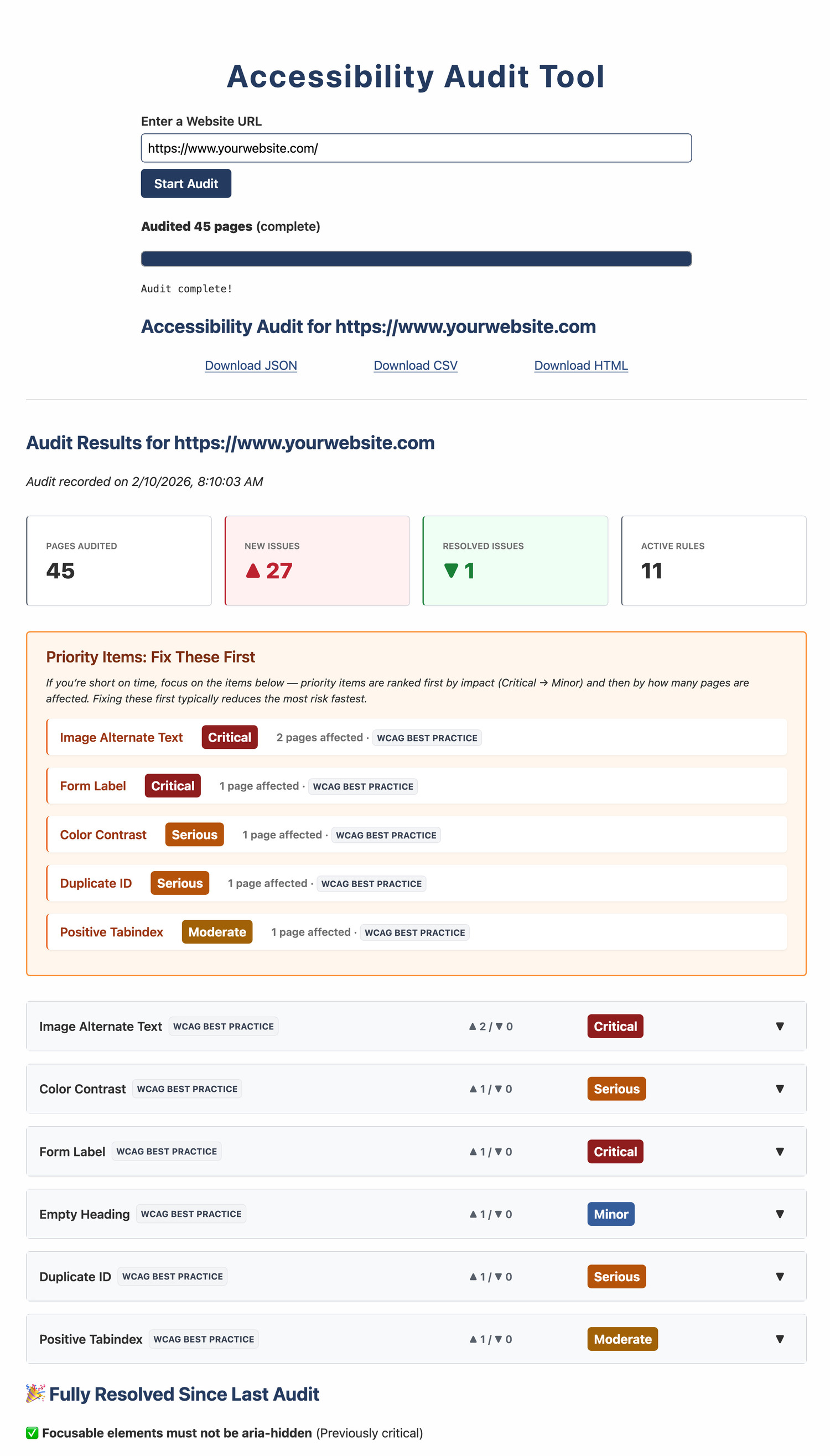
Honestly, this all started with boredom.
Not the fun kind of boredom where you learn to cook or binge Cheers for the bajillionth time, but the kind where you’ve been job hunting for far too long, your whole portfolio is expired or inactive, and you’ve lost track of what day it is.
I needed a project. Something more than a React calculator or a grocery list app or whatever. Something that helped solve an actual problem. Something I could point to and say, “I made this,” and maybe someone on the other end of an application would actually look at it.
Web accessibility is important to me. I run the usual tools. I fix what they flag. I try to be thoughtful and proactive. But I keep feeling like I'm only ever checking boxes on a single page at a time, hoping the rest of the site was fine. That’s what most free accessibility tools do: one page in, one page out. Helpful, for sure. And necessary. But also narrow.
The moment you try to understand an entire site — shared components, repeated patterns, forgotten one-off marketing pages with who-knows-what embedded in them — things get trickier. To be fair, there are lots of good tools that handle all that. But they’re usually aimed at organizations with accessibility budgets, not individuals trying to learn or improve on their own.
So, finally (MUCH later than I really should admit), it occurred to me: Why not make my own?
And that’s how I ended up building an accessibility auditing tool. Not as a grand vision, but as a way to stay busy, learn something useful, and maybe make a dent in a problem I already cared about.
Why I Made This Thing
If you already use tools like axe or WAVE or Lighthouse, you know they’re great. The problem isn’t what they test, it’s how much they test.
Most of the free, approachable tools are designed for one page at a time. That’s fine when you’re spot-checking, but it falls apart as soon as you need to understand how accessible an entire site really is.
There are ways around that. If you’re a developer, you can wire axe-core into your pipeline and get solid coverage. That’s awesome... but also very easy to put off when you’re busy shipping actual features. It’s even less helpful if you don’t have a pipeline (guilty), or if you’re working on something small or static (hi again).
And sometimes, you’re not a developer at all. Maybe you’re a QA analyst, a project manager, or the unlucky person who inherited “accessibility” as a responsibility and now just needs a tool that answers reasonable questions without requiring a deep dive into build systems and configuration files.
Tools that solve all of this do exist. I’ve used several of them, and they’re very good. They’re also priced for organizations that already have accessibility budgets, not for individuals, small teams, or people just trying to do the right thing.
I checked pretty much every box on that list at some point, so I tried to build the simplest version of the tool I wished I’d had myself.
What This Thing Does (In a Nutshell)
I wanted something simple and practical:
- It runs in a browser;
- It reads an XML sitemap;
- It visits every page it finds;
- It runs familiar accessibility checks;
- And it produces reports that a human can actually read
That’s it. Minimal setup (you’ll still need Node, npm and Git). No pipeline required.
You point it at a site, it looks at the whole thing, and it helps you see patterns that are invisible when you’re only testing one page at a time.
This is probably most useful if you’re a developer, QA analyst, or PM working on a site that doesn’t have a full accessibility pipeline or where accessibility checks tend to happen late, inconsistently, or only on a handful of pages.
You don’t need to be an accessibility expert to use it, but today you do need to be comfortable running a local tool (or know someone who is). Hopefully it lowers the barrier enough to make whole-site checks more common, even if they’re imperfect.
This Thing Isn't Perfect
Let's be clear and up-front, because this matters:
- This tool is NOT point-and-click — some local setup is required.
- It is NOT an accessibility expert.
- It does not replace manual audits.
- It does not replace testing with real users.
- And it definitely does not replace people who do this work professionally, every day.
Real accessibility is a human problem. It requires human judgment. No amount of scripting gets you around that. This tool just helps find patterns and questions earlier, not stamp a seal of approval at the end.
If You’re Curious
Here's the repo. Give it a look.
This thing is still pretty rough. There are decisions I’m not 100% confident about yet. Some (most, if history is any indication) of them may be wrong.
If you work in web development, accessibility, or adjacent spaces — or if you’ve ever used an audit tool and thought “this doesn’t quite tell me what I need” — I’d genuinely love your feedback. Especially if you find things like:
- False positives or things that don’t matter
- Things it misses that absolutely should be flagged
- Features you'd like to see
- Places where the language could be clearer
- Actual bugs where something doesn't work
You don’t have to be polite, but I’d ask that you please be constructive. The goal is to see if this could potentially be useful to anyone who’s not me, and then find ways to make it more useful.
Worst case, you’ll tell me someone else already built it (and built it better), at which point I’m happy to say I learned a lot of new stuff making this and I’ll just keep using it for myself. Best case, it becomes a helpful tool for at least one other person in the world.